您现在的位置是:网站首页> 编程资料编程资料
ASP.NET Core 导入导出Excel xlsx 文件实例_实用技巧_
 2023-05-24
556人已围观
2023-05-24
556人已围观
简介 ASP.NET Core 导入导出Excel xlsx 文件实例_实用技巧_
ASP.NET Core 使用EPPlus.Core导入导出Excel xlsx 文件,EPPlus.Core支持Excel 2007/2010 xlsx文件导入导出,可以运行在Windows, Linux和Mac。
EPPlus.Core 是基于EPPlus 更改而来,在Linux 下需要安装libgdiplus 。
EPPlus:http://epplus.codeplex.com/
EPPlus.Core:https://github.com/VahidN/EPPlus.Core
下面在ASP.NET Core 中导入导出Excel xlsx 文件。
新建项目
新建一个ASP.NET Core Web Application 项目ASPNETCoreExcel,选择Web 应用程序 不进行身份验证。
然后添加EPPlus.Core 引用。
使用NuGet 命令行:
Install-Package EPPlus.Core
也可以使用NuGet包管理器安装。
导出xlsx文件
新建一个XlsxController ,添加Export 操作。
public class XlsxController : Controller { private IHostingEnvironment _hostingEnvironment; public XlsxController(IHostingEnvironment hostingEnvironment) { _hostingEnvironment = hostingEnvironment; } public IActionResult Index() { return View(); } public IActionResult Export() { string sWebRootFolder = _hostingEnvironment.WebRootPath; string sFileName = $"{Guid.NewGuid()}.xlsx"; FileInfo file = new FileInfo(Path.Combine(sWebRootFolder, sFileName)); using (ExcelPackage package = new ExcelPackage(file)) { // 添加worksheet ExcelWorksheet worksheet = package.Workbook.Worksheets.Add("aspnetcore"); //添加头 worksheet.Cells[1, 1].Value = "ID"; worksheet.Cells[1, 2].Value = "Name"; worksheet.Cells[1, 3].Value = "Url"; //添加值 worksheet.Cells["A2"].Value = 1000; worksheet.Cells["B2"].Value = "LineZero"; worksheet.Cells["C2"].Value = "http://www.cnblogs.com/linezero/"; worksheet.Cells["A3"].Value = 1001; worksheet.Cells["B3"].Value = "LineZero GitHub"; worksheet.Cells["C3"].Value = "https://github.com/linezero"; worksheet.Cells["C3"].Style.Font.Bold = true; package.Save(); } return File(sFileName, "application/vnd.openxmlformats-officedocument.spreadsheetml.sheet"); } } 通过依赖注入获取HostingEnvironment,对应可以获取程序的相关目录及属性。
然后添加Index 视图增加一个链接导出Excel
@{ } ASP.NET Core 导入导出Excel xlsx 文件
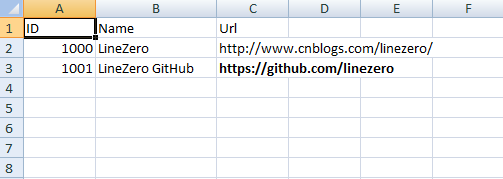
导出Excel点击导出文件,打开结果如下。
导入xlsx文件
在index视图中添加一个上传文件,添加Import操作。
Index.cshtml
@{ } ASP.NET Core 导入导出Excel xlsx 文件
导出Excel
[HttpPost] public IActionResult Import(IFormFile excelfile) { string sWebRootFolder = _hostingEnvironment.WebRootPath; string sFileName = $"{Guid.NewGuid()}.xlsx"; FileInfo file = new FileInfo(Path.Combine(sWebRootFolder, sFileName)); try { using (FileStream fs = new FileStream(file.ToString(), FileMode.Create)) { excelfile.CopyTo(fs); fs.Flush(); } using (ExcelPackage package = new ExcelPackage(file)) { StringBuilder sb = new StringBuilder(); ExcelWorksheet worksheet = package.Workbook.Worksheets[1]; int rowCount = worksheet.Dimension.Rows; int ColCount = worksheet.Dimension.Columns; bool bHeaderRow = true; for (int row = 1; row <= rowCount; row++) { for (int col = 1; col <= ColCount; col++) { if (bHeaderRow) { sb.Append(worksheet.Cells[row, col].Value.ToString() + "\t"); } else { sb.Append(worksheet.Cells[row, col].Value.ToString() + "\t"); } } sb.Append(Environment.NewLine); } return Content(sb.ToString()); } } catch (Exception ex) { return Content(ex.Message); } } 运行程序打开http://localhost:5000/xlsx
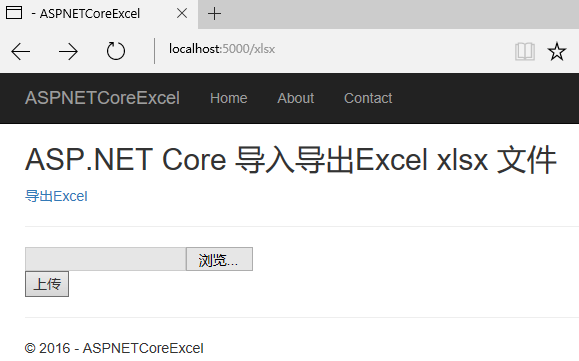
上传对应文件,显示如下。
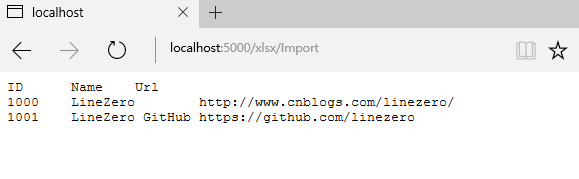
ASP.NET Core简单的导入导出Excel 功能也就完成了。
以上就是本文的全部内容,希望对大家的学习有所帮助,也希望大家多多支持。
相关内容
- asp.net分页控件使用详解【附实例下载】_实用技巧_
- asp.net创建事务的方法_ASP.NET_
- 详解.NET中使用Redis数据库_实用技巧_
- 详解开源免费且稳定实用的.NET PDF打印组件itextSharp(.NET组件介绍之八)_实用技巧_
- 详解一款开源免费的.NET文档操作组件DocX(.NET组件介绍之一)_实用技巧_
- 详解ASP.NET 生成二维码实例(采用ThoughtWorks.QRCode和QrCode.Net两种方式)_实用技巧_
- 详解免费开源的DotNet二维码操作组件ThoughtWorks.QRCode(.NET组件介绍之四)_实用技巧_
- 详解免费开源的.NET多类型文件解压缩组件SharpZipLib(.NET组件介绍之七)_实用技巧_
- 详解ASP.NET Core 在 JSON 文件中配置依赖注入_实用技巧_
- .NET中的repeater简介及分页效果_实用技巧_


